3D Packshots for Ecommerce: What They Are and When to Use Them
"3D packshot" is used for at least three different things: an interactive product model, a turntable video, and a polished still rendered from 3D. Those assets can share a production pipeline, but they are not interchangeable on a product detail page.
The short version: use a true 3D model when letting the shopper control the view answers a buying question that still images do not. Keep photography as the source of truth, and do not sell a sequence of generated angles as dimensionally accurate 3D.
From a dress photo to a packshot
The generated image gives the dress volume without a visible mannequin. Compare the neckline, seams, and hem with the original photo.
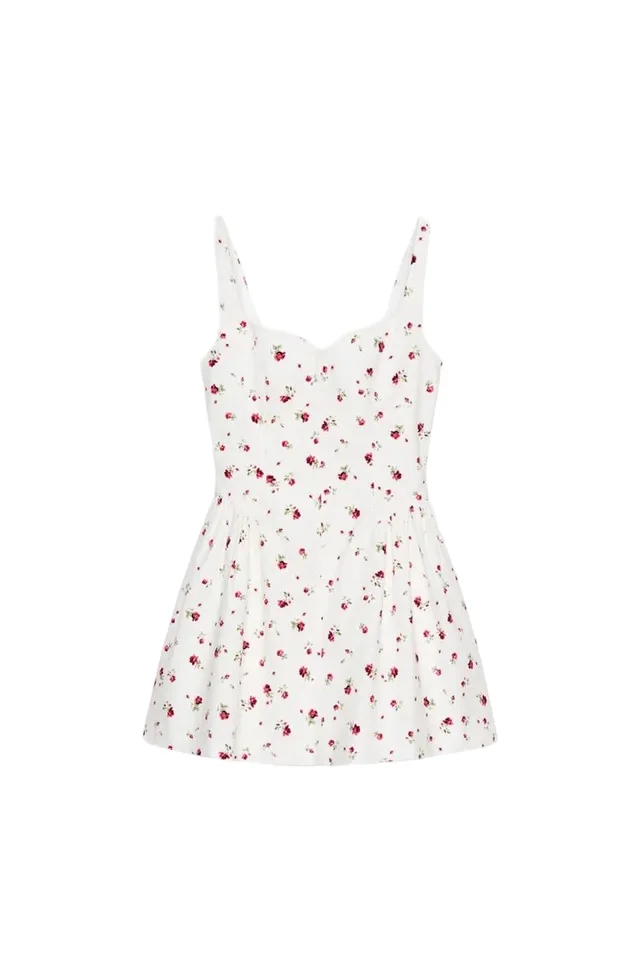
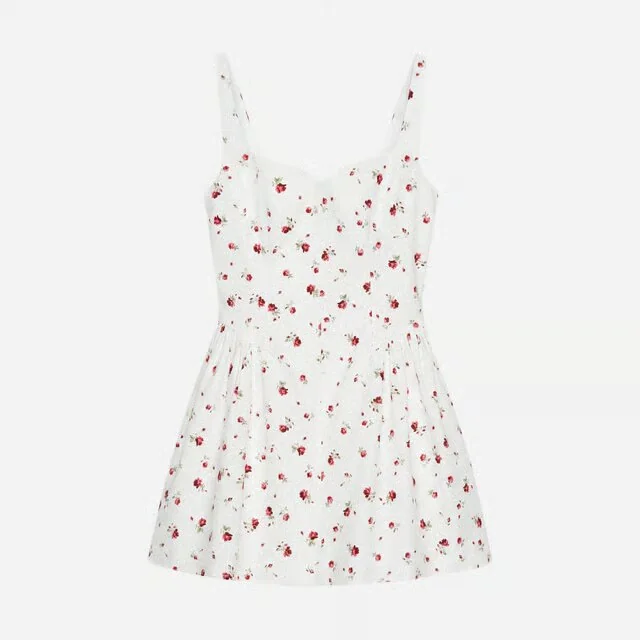
Details hidden in the original photo still need checking against additional product photos.
Last fact check: August 31, 2026. Search-intent review: September 7, 2026. Platform specifications change; verify the linked Shopify and Amazon requirements before delivery.
First, name the asset correctly
| Asset | What the shopper receives | Typical file or delivery | Best at | It is not |
|---|---|---|---|---|
| Interactive 3D model | A product that can be rotated and zoomed freely | GLB/USDZ in a web viewer | Shape, hardware, construction, scale, AR | A video |
| 360 spin | A fixed sequence of views around the product | Image sequence, MP4, or WebM | Controlled all-around inspection | Free-camera 3D |
| Rendered still | One camera angle exported from a 3D scene | JPEG, PNG, or WebP | A repeatable packshot or campaign angle | Interactive media |
| Generated multi-angle set | Several plausible views created from references | Separate image files | Fast creative exploration and secondary assets | Evidence of hidden geometry |
The distinction matters because the trust claim changes. A captured or carefully modeled object can preserve measured geometry. A generated rear view may look persuasive while inventing a seam, heel counter, pocket, or fastening the source image never showed.
If the job is a clean primary image, start with a packshot. If it is apparel volume without a visible body, use ghost mannequin photography. If it is fit and styling, flat lay to on-model solves a different problem. Use 3D when the interaction itself is useful.
Can AI generate multiple product angles from one photo?
Yes, but it generates plausible views, not a measured reconstruction of surfaces it has never seen. That can be a useful AI product photography workflow when a team needs a three-quarter campaign still, a fast rotation, or secondary PDP imagery and can review every result.
The evidence limit is simple:
- A visible logo, seam, handle, or panel can be carried into another composition and checked against the source.
- A hidden pocket, sole, back closure, interior, or underside must be inferred unless another reference shows it.
- A smooth-looking sequence can still change product geometry between frames.
- A generated side or back view should not be used to prove a feature that was absent from the input.
Supply front, back, side, detail, material, and dimension references when those surfaces matter. Use generated angles as reviewed creative derivatives; use captured multi-angle photography, production CAD, photogrammetry, or a measured model when the output must establish literal shape and construction.
This is also why a generated set is not automatically a 360 product spin. A spin needs consistent geometry through the full rotation. A true 3D packshot needs one coherent object that the shopper can inspect freely. The broader AI product photography guide explains how these derivatives fit into the complete production workflow.
Where 3D earns its place
3D works best when the customer wants to inspect structure rather than just admire styling.
Footwear. A shopper can check the sole, heel, toe shape, closure, and construction from angles that would otherwise require a long gallery. Material behavior still needs careful capture; a technically correct shape with plastic-looking leather is not a faithful model. The category-specific failure modes are covered in AI footwear photography.
Bags and structured accessories. Shape, handles, hardware, gussets, pockets, and scale are strong 3D jobs. An interior that matters needs to be modeled and exposed deliberately; rotating a closed bag does not answer an interior-capacity question.
Jewelry and watches. 3D can reveal settings and mechanisms, but polished metal, stones, engraving, and real-world scale are difficult. Keep macro photography beside it. Jewelry imagery has a higher accuracy bar than almost any other ecommerce category.
Furniture and home goods. This is the clearest AR case because placement and physical scale are buying questions. It is also where dimensions must be trustworthy: an attractive model at the wrong scale defeats the purpose.
Soft apparel. Possible, not easy. A handbag holds a stable form; a dress changes with body, size, pose, gravity, and fabric. One draped 3D garment is a visualization of one state, not proof of fit across customers.
What a production-ready model needs
A model is not finished because it rotates.
Geometry
The silhouette, dimensions, thicknesses, panel lines, and hardware placement must match the sold object. Small deviations become obvious once the shopper can choose the angle. For hard goods, record physical measurements. For soft goods, define the intended draped state and do not imply it represents every size.
Materials
Color, roughness, reflectivity, normal detail, and transparency are separate properties. A single beige texture does not describe suede, coated canvas, and pebble leather. Review the model under more than one neutral lighting environment so a material is not only convincing in the artist's preferred setup.
Hidden views
The bottom, back, interior, closure, and undercuts are exactly why someone opens a 3D viewer. If those surfaces were not in the reference set, capture them or mark the model incomplete. Never let a generative fill become product evidence by accident.
Performance
A beautiful model that delays the page is a poor commerce asset. Shopify accepts GLB and USDZ files up to 500 MB and automatically optimizes models over 15 MB, but an upload ceiling is not a performance target. Shopify's own 2026 guide calls roughly 4 MB an ideal GLB size; test the real page on a mid-range phone and a throttled connection. See Shopify's product media type requirements.
Shopify and Amazon are different jobs
Shopify implementation
Shopify supports product images, hosted or embedded video, and interactive 3D models. A compatible theme is required for video and 3D, and Shopify notes that those two media types cannot be assigned as variant media. Its help center also says the first product-media item becomes the featured media used in places such as collections and cart, so the default order deserves deliberate testing. The operational details are in the Shopify product media guide.
For 3D, Shopify accepts GLB and USDZ and converts files so both formats are available across Android and iOS devices. Uploading one correct model is the platform step; proving that materials, scale, load behavior, poster image, controls, and mobile interaction work is the production step.
Amazon listing
Treat the main Amazon image as a separate marketplace-safe asset. Amazon's public advertising guidance recommends a plain white background, at least 80% product fill, and images at least 1,000 pixels on a side to enable zoom. Seller Central's full rules and category guides govern acceptance and can be stricter. An interactive 3D experience is not a substitute for that image.
A spin video or rendered detail may still be useful elsewhere in the Amazon asset system, subject to the account, category, placement, and current policy. Build outward from the approved main image; do not force a Shopify media stack into Amazon unchanged. See Amazon product images for apparel.
The evidence is promising, not universal
Shopify's Rebecca Minkoff case study reports that shoppers who interacted with a 3D model were 44% more likely to add the item to cart and 27% more likely to order; it reports a 65% higher purchase likelihood among visitors who used AR. Those are vendor-published results from one brand, not a forecast for every catalog. The people who choose to interact may already have higher intent, and the page, products, traffic, and implementation all matter.
The responsible use of that case study is to justify a test, not a business case with a guaranteed lift.
A practical 3D packshot workflow
- Write the buying question. “Show the clasp and interior depth” is useful. “We need 3D” is not a brief.
- Choose the source of truth. Physical product, production CAD, or a measured scan. Record version and colorway.
- Capture the reference set. Front, back, sides, top, bottom, interior, hardware, material close-ups, and measurements.
- Model and texture. Separate geometry approval from material approval so a convincing render does not hide a wrong shape.
- Review against the object. Use matched angles and neutral light. Check dimensions, construction, labels, closures, color, roughness, and hidden surfaces.
- Optimize a delivery copy. Keep a high-resolution master; decimate geometry and resize textures for the web version without damaging the parts customers inspect.
- Test the live viewer. Desktop, iOS, Android, keyboard, touch, zoom limits, AR scale, poster image, loading state, and fallback behavior.
- Measure by product cohort. Start with categories where inspection should matter, then compare against similar products without 3D.
The unit of work is not one hero model. It is the source package, approved master, channel exports, poster image, QA record, and measurement plan.
The QC gate
Before publication, check:
- Overall dimensions and scale against the physical specification
- Silhouette from front, side, back, top, and bottom
- Hardware count, placement, color, and mechanical state
- Seams, panels, edges, sole geometry, pockets, and closures
- Material response under neutral and bright lighting
- True product color against an approved photographed reference
- Interior and underside completeness
- File size, first load, interaction smoothness, and fallback image
- AR scale and floor placement where AR is enabled
- Correct product and colorway mapping in the catalog
If any view is invented, label the asset as a generated derivative in the production record and keep it out of positions where the shopper expects literal product evidence.
When not to use 3D
Skip it when still images already answer the buying question, the product changes too frequently to recover the modeling cost, the only references are incomplete, or the team cannot maintain the model when construction changes.
Also skip it when the purpose is only motion. A short rotating video can be lighter to produce, easier to art-direct, and more predictable across channels. The right format is the smallest one that explains the product honestly.
Frequently asked questions
What is a 3D packshot?
A 3D packshot is a digital product model that a shopper can rotate and zoom. In ecommerce it is usually delivered as a GLB or USDZ file and rendered in an interactive viewer. A still render or a rotating video may be made from the same model, but neither is itself interactive 3D.
Is a 360 product spin the same as a 3D model?
No. A 360 spin is a sequence of photographed or rendered views, usually played as an animation. A true 3D model lets the shopper control the camera freely and can support augmented reality when the platform and model are configured for it.
Which fashion products are best suited to 3D packshots?
Footwear, bags, jewelry, watches, and structured accessories are usually stronger candidates than soft garments because their geometry is stable. Clothing can work, but believable drape, interiors, and size-dependent fit make it a materially harder modeling job.
Can a 3D packshot replace product photography?
Usually not. Keep an approved photograph as the source of truth for color, finish, construction, and marketplace compliance. Use 3D to add controlled inspection, configurable views, or augmented reality where those interactions answer a real buying question.
How should a brand measure whether 3D product media works?
Instrument model loads, interactions, add-to-cart, purchase, and returns, then compare equivalent products or run a controlled test. Interaction cohorts are useful diagnostics, but they do not prove that 3D caused the result because more interested shoppers are also more likely to interact.
Can AI generate multiple product angles from one photo?
AI can generate plausible front, side, back, or three-quarter product views from one photo, but any surface missing from the source is inferred rather than recovered. Use generated angles for creative and secondary assets after review; supply real reference views or measured 3D data when the output must prove construction.
Explore Astria's 3D packshot workspace, or see Astria for fashion and ecommerce.
For current Astria rates and billing terms, see Astria pricing.