AI Product Photography for Ecommerce: What Works and What Breaks
AI product photography is not one button that replaces a studio. It is a set of production methods: clean an existing photograph, put the product into a new scene, show it with a person, or turn one approved reference set into a family of catalog and campaign assets.
The short version: start with evidence of the real product, generate only the variations the evidence can support, and approve product truth before art direction. The useful metric is not how many images the system makes. It is how many accurate images your team can publish.
Reviewed September 7, 2026. This guide is published by Astria. Product and channel features can change; current first-party sources are linked where they support a claim.
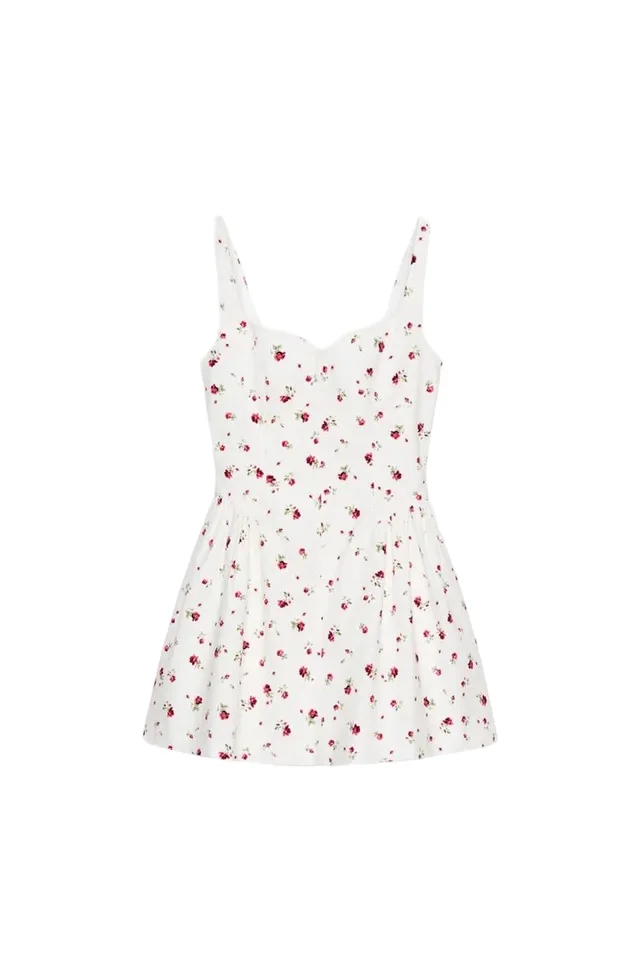
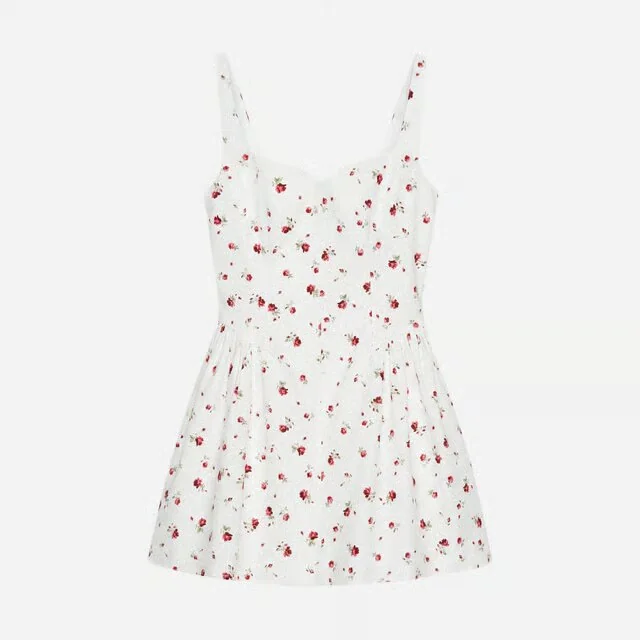
A product photo and an AI packshot for the listing
This dress example shows how a product photo becomes a clean packshot. Check the garment details and your store’s image requirements before using the result.
What is AI product photography?
AI product photography uses generative or editing models to make commercial images from product references and creative direction. Some workflows preserve the photographed product and change only its surroundings. Others regenerate more of the frame to create a new angle, person, pose, or composition.
Those operations carry different risk. Removing a background does not ask the system to reconstruct a shoe. Generating the back of that shoe from one front photograph does.
| Workflow | What changes | Best use | Main review risk |
|---|---|---|---|
| Cleanup and standardization | Background, crop, exposure, shadow, or canvas | Marketplace and catalog consistency | Edge damage, false shadow, color shift |
| Scene generation | Environment, surface, lighting, props | Lifestyle, campaign, social, and ads | Product shape, label, reflection, or scale drift |
| Product-to-model | Person, pose, drape, and scene around a garment or accessory | On-model PDP images and fashion campaigns | Fit implication, print, construction, anatomy |
| Campaign variation | Casting, crop, location, format, or message across a set | Collection launches and channel variants | The individual images pass but the set loses consistency |
Start by naming the operation. “Make this look premium” is not a production brief. “Preserve the approved bottle, label, cap geometry, and color; replace only the surface and background” is reviewable.
One product, three asset roles
The public Handbag Formation workspace shows how one product can move from a clean catalog view to another product angle and then into on-model context. These are generated outputs for the same Lara Frame Bag—not a claim that matching automatically makes them accurate. A reviewer should still compare the closure, strap attachment, print scale and direction, hardware, and silhouette with the approved references.


Public Astria outputs, retrieved from workspace 866 on September 7, 2026. Select an image to inspect its generation record.
Begin with a product source of truth
The first input should establish what the customer will receive. It does not need to be the final hero image, but it needs to show the product clearly enough to catch a wrong output.
A useful reference set can include:
- clean front and back photographs;
- side, sole, interior, or closure views when construction matters;
- a neutral-light color and material reference;
- macro details for logos, labels, hardware, seams, stones, texture, and print;
- dimensions or scale references for structured objects;
- an approved on-model view when drape or placement must remain consistent.
One source image can be enough for a candle, a simple bag, or a campaign experiment. It is rarely enough to prove hidden construction. If a photograph does not show the back pocket, the system can create a plausible pocket; it cannot know that this is the pocket on the sold item.
That is the dividing line between creative interpretation and product evidence. Use AI freely for the former after approval. Preserve reliable physical capture for the latter. The AI-versus-studio guide explains how to split those jobs in a hybrid workflow.
How to create AI product photography: a six-step workflow
1. Define the asset's job
Write the channel and buying question before choosing a tool or prompt.
- A marketplace main image identifies the exact product quickly.
- A PDP alternate view explains scale, use, fit, or construction.
- A lifestyle image supplies context.
- A campaign hero creates desire and leaves room for layout.
- A social variation needs a native crop and an immediate visual idea.
The same attractive image will not do all five jobs equally well.
2. Build the minimum sufficient reference set
Include every view needed to judge the requested output. A generated front-facing model image may need one clean garment reference. A side-and-back sequence needs evidence of the side and back if accuracy matters.
Prepare the files consistently: neutral light, accurate white balance, enough resolution for texture, and no folds or props that hide the product. For clothing, the flat-lay-to-on-model guide shows which source photographs survive conversion and which details need individual review.
3. Separate invariants from creative variables
List what cannot change:
- silhouette and proportions;
- color and material;
- logo, label, and printed copy;
- hardware count, finish, and placement;
- garment construction, pattern direction, and closures;
- any feature tied to a performance or fit claim.
Then list what may change: model, pose, location, surface, crop, lighting, props, and aspect ratio. This gives the operator and reviewer the same definition of success.
4. Approve one hard product before running a batch
Do not prove a workflow on the easiest white T-shirt in the catalog. Use a product with a directional print, reflective hardware, fine text, transparency, asymmetry, or difficult drape.
Generate several outputs, record why each one passes or fails, and correct the workflow rather than rescuing every image manually. When one demanding SKU passes, test the same treatment on a small range before extending it to the full catalog.
5. Review product truth before creative quality
Use two gates, in order.
Product QA: compare the result with the approved references. Check silhouette, color, scale, material, print, logo, label text, closures, hardware, transparency, reflections, and any visible claim-bearing feature.
Creative approval: only after product QA passes, judge casting, styling, composition, lighting, crop, hierarchy, brand tone, and channel fit.
This order prevents a beautiful image from being approved before anyone notices that it shows a different product.
6. Export a channel-aware asset kit
Keep explicit asset classes instead of one folder named final:
- physical source-of-truth photographs;
- marketplace main and alternate images;
- approved generated on-model and lifestyle images;
- campaign, social, email, and paid-media crops;
- video or motion derivatives;
- rejected outputs retained where they help audit the process.
For Shopify, the first media item also appears in collection and cart contexts, and video or 3D behavior depends on the theme. Use the Shopify product media guide to design the gallery order. For Amazon apparel, check the current marketplace and category rules against the Amazon product image guide rather than assuming a creative asset can serve as the main image.
Which product categories need the most caution?
| Product | Useful AI jobs | Keep as physical evidence | Watch closely |
|---|---|---|---|
| Simple apparel | On-model, styling, location, crop, colorway campaign | True color, construction, fit evidence | Hem length, closures, drape, print |
| Footwear | On-foot context, campaign scenes, secondary angles | Sole, heel, interior, material, dimensions | Pair symmetry, laces, logo, hardware |
| Bags | On-body scale, lifestyle, launch campaign | Interior, closures, pockets, exact hardware | Handle attachment, gusset, shape, scale |
| Jewelry and watches | On-body context, mood, social crops | Macro geometry, stone count, engraving, finish | Reflections, tiny proportions, placement |
| Beauty and packaged goods | Surfaces, sets, model context, campaign layouts | Shade, formula appearance, exact packaging and text | Label spelling, cap geometry, color, transparency |
The stricter guide for reflective small objects is AI jewelry photography. Footwear has its own review conventions in AI footwear photography.
Can AI generate multiple product angles from one photo?
It can generate plausible alternate views. That is useful for creative exploration, campaign motion, and secondary imagery after review. It is not the same as recovering measured geometry.
If the input shows only the front, the back is an inference. The result may invent a seam, pocket, heel counter, clasp, or label. Supply real reference views for every surface that customers use to verify the product.
Choose the format according to the promise:
- generated angle stills for fast creative coverage;
- a captured 360 spin for a fixed, evidence-based rotation;
- a modeled GLB or USDZ for interactive viewing and AR;
- physical detail photographs when the view must prove construction.
The 3D packshot guide separates those deliverables and explains why a convincing rotation is not automatically true 3D.
How to choose an AI product photography tool
The useful buying questions are operational:
- Can it preserve your hardest products, not just its demo objects?
- Does it support the input types you actually have: cutout, flat lay, ghost mannequin, on-model, or several reference views?
- Can an approved treatment be reused across products, colorways, people, and formats?
- Can several people review, correct, and reproduce the work?
- Does it expose a correction path when one detail fails?
- Can it export the required resolution, aspect ratio, metadata, naming, and channel formats?
- What is the cost per approved image after rejects and review?
A one-off generator can be the right purchase for a seller making five listing images. A fashion production system is a different purchase: the treatment has to survive a collection, a team, and a change of brief. The AI fashion photography platform shortlist compares those categories without treating them as interchangeable.
Calculate cost per approved output
The advertised generation price is only one line in the budget. Count:
- reference capture and preparation;
- workspace or template setup;
- generation attempts and failed outputs;
- product QA and creative review;
- correction, regeneration, compositing, and retouching;
- crops, exports, metadata, naming, and catalog integration;
- reshoots or physical detail photography still required.
Then divide the total by assets that pass review and reach a real channel. The product photography cost-per-SKU formula provides the fuller worksheet. For a direct production comparison, use AI versus traditional photoshoot cost.
A reusable brief
Use a brief that a second operator can reproduce:
Asset job: [marketplace alternate / PDP lifestyle / campaign hero / social]
Product references: [front / back / side / detail / color / dimensions]
Must preserve: [silhouette / material / color / logo / label / hardware]
May change: [model / pose / background / lighting / crop / props]
Required output: [count / aspect ratio / resolution / file type]
Product rejection rules: [specific visible failures]
Creative approval rules: [composition / brand tone / channel fit]
Physical evidence retained: [main image / detail views / fit or scale proof]
For scene and lighting language, the ecommerce product photography prompts guide provides production-ready prompt structures. The brief above controls the job around the prompt.
Where Astria fits
Astria's public ecommerce workflow starts with a creative template and product photos, then generates product and campaign imagery for lookbooks, social, ads, and other digital channels. The same public page positions the system around repeatable brand direction and large catalogs rather than isolated one-off images. Astria for fashion and ecommerce.
The practical starting point is a small proof using your own products. Choose one easy SKU and one difficult SKU, define the invariants, run one approved treatment across both, and measure product accuracy, review time, rejects, and cost per approved output. Browse the public brand lookbooks gallery for finished directions, then judge the workflow on your own reference set.
Frequently asked questions
What is AI product photography?
AI product photography uses generative or editing models to create and modify commercial product images. It can clean a source photo, replace its background, place a product with a model, or extend an approved reference into catalog and campaign variations. Generated images still need to be checked against the real product.
What photo do you need to create AI product images?
Start with a sharp, evenly lit photo that shows the complete product at useful resolution. Add front, back, side, detail, material, and color references whenever those views matter. An AI system can infer a surface it has not seen, but it cannot establish that the invented detail matches the sold product.
Can AI product photography replace a photoshoot?
It can replace or extend some production, especially background, on-model, campaign, crop, and channel variations made from approved references. Keep physical photography for product-proof views, exact color and material evidence, construction details, measured fit claims, and any marketplace image that requires a faithful source photograph.
How do you check an AI product photo for accuracy?
Compare the output with the approved product references before judging its creative quality. Check silhouette, dimensions, color, texture, print, logo, label text, closures, hardware, transparency, reflections, and any detail that could change what a customer thinks they are buying.
How should ecommerce teams calculate the cost of AI product photography?
Use cost per approved published asset, not cost per generation. Include source preparation, setup, generations, rejected outputs, review, correction, retouching, export, and the physical reference photography the workflow still requires.
Sources and methodology
Astria workflow statements use its current ecommerce page and public workspaces gallery. The handbag examples were selected through the Astria CLI from the public Handbag Formation workspace, then cached locally for stable article delivery; the linked generation records are prompts 46567362, 46567361, and 46526870 in workspace 866. Google Merchant Center's current AI-generated content guidance requires supported generative images to retain the applicable IPTC digital-source metadata; that is a specific channel requirement, not a universal publishing rule. Marketplace implementation details remain with the separately sourced Shopify and Amazon guides linked above.
This is a production framework, not a cross-vendor image benchmark or a claim that every product can be reconstructed from one photograph. The cover is an AI-generated editorial illustration of a fictional, brand-neutral handbag workflow, not a customer result.
Explore Astria for fashion and ecommerce.
For current Astria rates and billing terms, see Astria pricing.