Ecommerce Product Photography Prompts for PDP, Packshots and Campaigns
An ecommerce prompt should describe a media slot, not just a mood. “Minimal luxury product photo” does not tell the system whether you need the primary product-page image, a rear construction view, a size reference, a texture crop, or a campaign banner. The useful unit of work is the complete image family for one SKU.
The short version: define the channel, lock the product facts, and prompt each required view separately. Use this guide to build front, side, back, detail, lifestyle, and campaign images from a shared production brief. Public product workspaces, packshot templates, and finished prompt examples make the pattern easier to see.
Write for the media slot
Start with a table of required outputs. A useful apparel product page might need front, back, side, fabric detail, and on-model scale. A handbag may need front, side, open interior, hardware detail, and carry context. A bottle may need a primary packshot, side label, closure detail, texture, and a lifestyle image.
Give every slot a single job:
- Primary: identify the product immediately.
- Alternate angle: explain depth and geometry.
- Back or underside: disclose construction the hero cannot show.
- Detail: prove texture, closure, finish, or workmanship.
- Scale or use: show size and physical relationship.
- Campaign: attract attention without replacing factual coverage.
This prevents the common mistake of asking one beautiful image to do six incompatible things.
The production prompt structure
A dependable prompt contains eight decisions:
- Channel and slot: PDP hero, marketplace primary, collection tile, email banner, or social crop.
- Product: the reference item, colorway, variant, and configuration.
- Preservation: silhouette, dimensions, materials, seams, labels, hardware, print, closure, and quantity.
- Orientation: front, rear, side, three-quarter, top-down, open, closed, folded, or worn.
- Frame: camera height, crop, negative space, and aspect ratio.
- Surface and background: exact color, sweep, tabletop, plinth, or location.
- Light and shadow: direction, softness, reflections, highlight control, and contact shadow.
- Exclusions: props, hands, duplicate objects, glare, horizon lines, or decorative ingredients that do not belong.
Write the preservation clause from the product itself. A handbag needs handle count, gusset, closure and hardware. A bottle needs cap shape, fill level, glass color and label position. A dress needs neckline, waist, sleeve, fastening, hem and drape.
Compare the verticals before you prompt
The same photographic language does not create the same risk in every category. Use this as the first review pass before choosing an example below.
| Vertical | Hardest problem | References to supply | Notice first |
|---|---|---|---|
| Fashion catalog | Several garments must remain distinct while fitting one body | Clean product views for every garment and any visible back construction | Necklines, hems, print placement, layering and shoe contact |
| Lookbooks | Continuity across a sequence without repeating one pose | Approved cast, each look, hero treatment and location family | Cast drift, grade drift, styling changes and sequence rhythm |
| Jewelry | Tiny geometry changes can describe a different item | Verified macro, side profile and on-body scale reference | Stone count, prongs, band width, finish, reflection and scale |
| Beauty | Reflective packaging competes with exact labels and product color | Straight packshot, cap or pump detail, verified label artwork | Vessel shape, label placement, legibility, condensation and reflections |
| Wedding dresses | Beading, transparency, fitted construction and large moving volume interact | Front, back, bodice detail, hem and fabric close-up | Neckline, bead density, sleeve transparency, waist and train length |
| Vitamins and supplements | Packaging contains regulated copy and claims that must not be invented | Verified packshot, every label panel, closure and product-form reference | Dosage, quantity, seals, claims, ingredient copy and capsule count |
For vitamins and supplements, generate the scene around a verified package rather than treating generated label text as evidence. No dedicated public supplement workspace is claimed in this guide; the beauty workflow below is a visual starting point for bottles, not proof of label accuracy.
Apparel and ghost packshot prompts
1. Dress front view
Front view of the reference dress as a clean volumetric packshot. Preserve its silhouette, waist, seams, closures, pleats, fabric flow and hem. Center the full garment with clear negative space on a solid #F2F2F2 studio background; soft diffused light, restrained contact shadow, sharp focus, square composition.
The public 3D Ghost Packshots workspace shows this as a repeatable system. Compare its dress template, front-view prompt, and back-view prompt.
Ecommerce packshots
Turn a flat product view into a clean PDP asset
A square front view that explains the whole dress before editorial styling is introduced.
- PDP hero
- 1:1
- #F2F2F2
Reference inputs
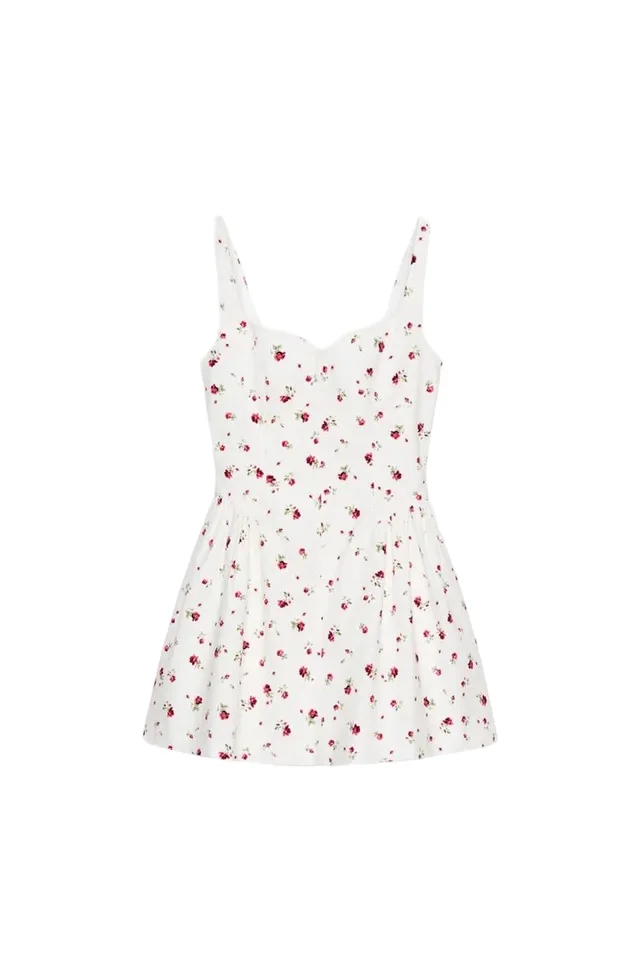
Generated result
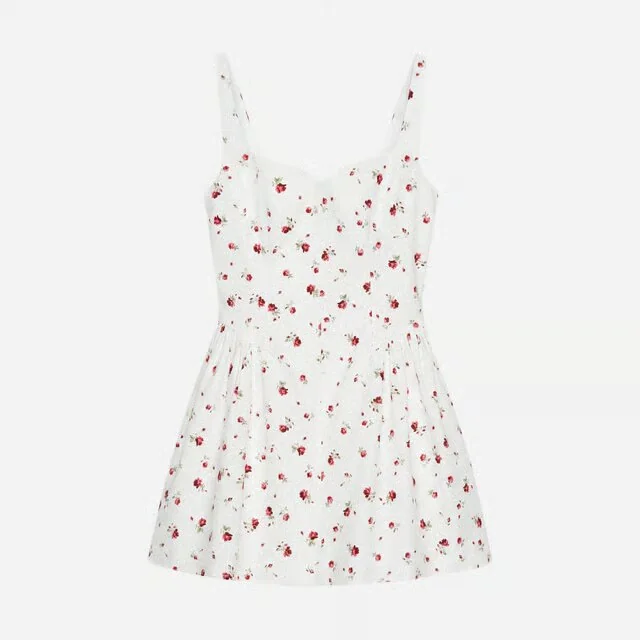
Front view of the reference dress as a clean volumetric packshot. Preserve its silhouette, straps, waist, seams, closures, floral print placement, fabric flow and hem. Center the full garment with clear negative space on a solid #F2F2F2 studio background. Soft diffused light, restrained contact shadow, sharp focus, square composition, no hanger, no mannequin and no visible label.A volumetric packshot has to add believable body and drape without inventing a different neckline, waist, print, or hem.
- Compare the strap width, neckline depth, waist seam, and flare with the source.
- Check that the floral motif stays small and distributed rather than becoming a new print.
- Inspect both side seams and the hem for accidental asymmetry.
- Measure the exported background and margins after generation; prompting a hex value is not a pixel-level check.
Reference and result images come from the linked public Astria example.
2. Dress back view
Back view of the same reference dress as a clean volumetric packshot. Preserve the rear neckline, closure, center-back seam, waist construction, pleats and hem length. Center the full garment at the same scale as the front view on a solid #F2F2F2 studio background; soft diffused light, restrained contact shadow, sharp square composition.
3. Knitwear folded view
Top-down ecommerce photograph of the reference knit folded into a neat rectangle with the collar, cuff and hem visible. Preserve the yarn color, knit pattern, ribbing, label position and material thickness. Warm-white seamless surface, large soft overhead source, gentle natural shadow, crisp texture, centered square composition, no props.
4. Apparel construction detail
Close product detail of the reference jacket's lapel, top button, chest seam and fabric weave. Preserve the exact lapel shape, button count, thread color and surface texture. Neutral light-grey background, soft raking light that reveals construction without changing the color, sharp focus across the product, square crop.
For apparel coverage beyond object-only imagery, use the AI fashion photography prompt guide and the AI lookbook guide.
Shoes, bags and accessories
Rigid products expose geometry errors quickly. Prompt the exact orientation and describe parts that must connect correctly.
5. Shoe three-quarter hero
Front three-quarter ecommerce packshot of one reference shoe, toe pointing slightly toward frame left. Preserve the toe shape, sole thickness, heel height, panel construction, stitching, laces and material color. Pale warm-grey sweep, camera at product height, soft key light from upper left, controlled highlights, subtle contact shadow, centered square image, no props.
The public Fashion 3D Packshots workspace includes dedicated shoe, handbag, and backpack templates.
6. Shoe side profile
Exact outer side profile of one reference shoe, placed flat with the sole parallel to the bottom edge. Preserve the heel, outsole, toe, upper panels, fastenings and stitching. Pure-white seamless background, neutral color balance, soft even light, clean edge separation, restrained contact shadow, square marketplace composition, no props.
7. Handbag front view
Straight-on front ecommerce photograph of the reference handbag standing upright with handles in their natural position. Preserve the bag's width-to-height ratio, gusset, seam lines, handle count, closure, pockets and hardware finish. Seamless warm-white background, camera centered at mid-product height, soft symmetrical studio light, clean contact shadow, square crop.
8. Handbag interior
Elevated three-quarter product photograph of the reference handbag opened naturally to show the interior organization. Preserve the exterior silhouette, handle attachments, zipper, lining color, pockets and hardware. Light neutral tabletop and background, soft overhead light with controlled interior fill, clear construction detail, square ecommerce composition, no unrelated props.
Beauty bottles and packaged products
Generated packshots can support concepting, campaigns, and variant production, but packaging requires strict review. Do not invent or silently alter label copy, quantities, seals, dosage information, claims, or regulated marks. When exact text matters, composite the verified artwork or use approved product photography.
9. Bottle primary packshot
Straight-on product-page packshot of one reference cosmetic bottle, upright and centered. Preserve the bottle proportions, glass color, fill level, shoulder shape, cap, pump, label size and label position. Seamless pure-white background, neutral color balance, soft vertical highlights that describe the form, clean edges, subtle contact shadow, square composition, no props.
10. Bottle material detail
Tight three-quarter detail of the reference cosmetic bottle focusing on the cap, shoulder, glass thickness and product texture. Preserve all proportions, material colors and hardware finishes. Pale stone surface, soft side light with controlled reflections, sharp product detail, shallow background only, vertical 4:5 crop.
The public Beauty workspace and Beauty template provide a starting point for campaign-oriented beauty imagery. Some finished prompt-detail pages may require sign-in, so use the public workspace or template as the durable entry point.
Beauty
Keep the bottle factual while the scene becomes expressive
A campaign still life built around a single verified product reference.
- Campaign
- 3:4
- Reflective set
Reference inputs
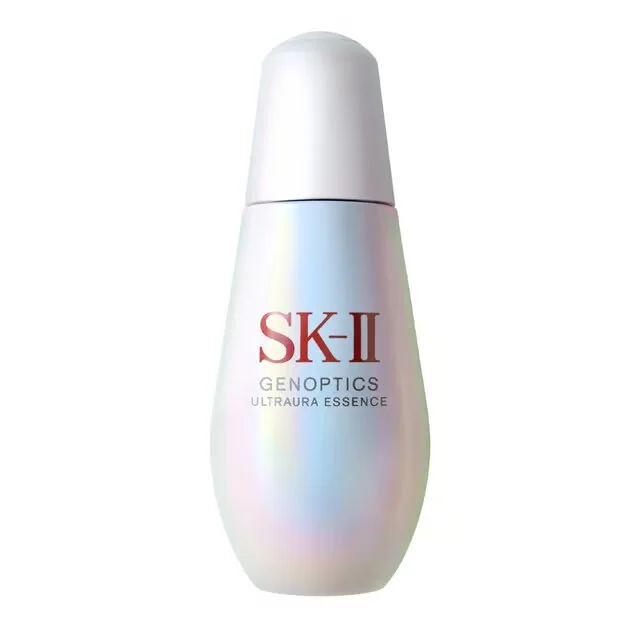
Generated result
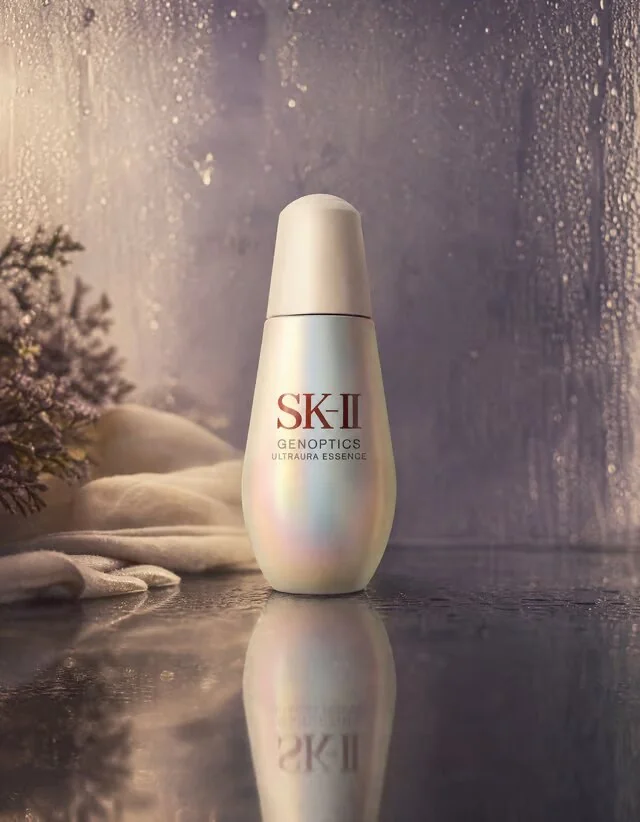
Still-life photograph with no person in frame. Place the reference cosmetic bottle upright on a shallow film of water over a dark reflective surface, with a soft mirrored reflection directly beneath it. Preserve the bottle proportions, pearlescent finish, cap, label size and label position. Add a cold glass pane with fine condensation immediately behind it and a seamless dusk-purple background. Low straight-on camera, one large diffused source from camera left, open shadows, faint warm haze, fine 35mm grain, gentle highlight halation, vertical 3:4.Reflective vessels, condensation, mirrored surfaces, and label fidelity all compete. The set can change; the package geometry and approved copy cannot.
- Follow the cap-to-body proportion and the bottle silhouette before judging mood.
- Keep droplets and glare away from the label-reading area.
- Check that the reflection mirrors the actual bottle rather than a different container.
- Use verified label artwork in the final production file whenever exact copy matters.
Reference and result images come from the linked public Astria example.
Jewelry: treat context and proof differently
Jewelry needs its own review standard because tiny changes can describe a different product. Preserve stone count, setting, prongs, band profile, metal color, finish, and scale. Keep a verified macro photograph when those facts drive purchase decisions.
11. Ring macro context
Macro product photograph of the reference ring resting in soft folds of light textured fabric. Use the fabric curves to frame the ring without obscuring its setting, band profile or stone. Preserve stone count, setting geometry, prongs, metal color and finish. Warm diffused natural light, clean neutral background, crisp metal and gemstone detail, shallow depth of field and a restrained luxury editorial mood; square composition.
See the public Jewelry Product Photography workspace, Ring template, and its macro, lifestyle, and on-model examples. For category-specific caveats, read the AI jewelry photography guide.
Jewelry
Move from a verified ring to an editorial macro
A contextual detail image that adds material atmosphere without replacing the factual product macro.
- Detail
- 1:1
- Macro
Reference inputs
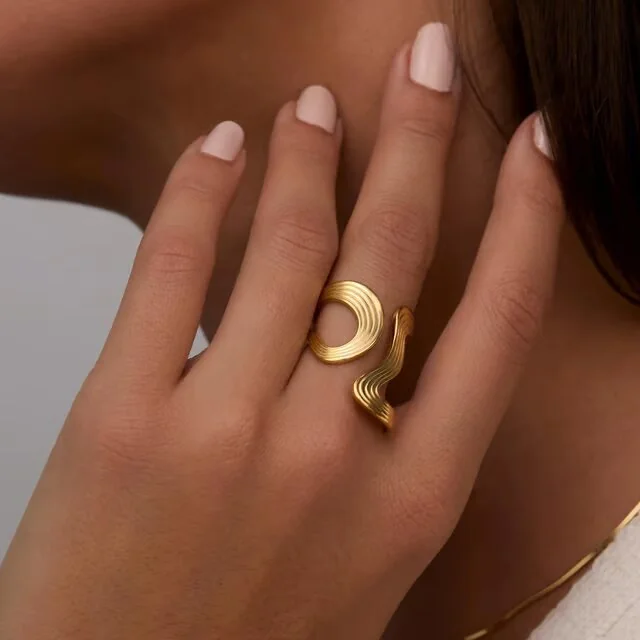
Generated result
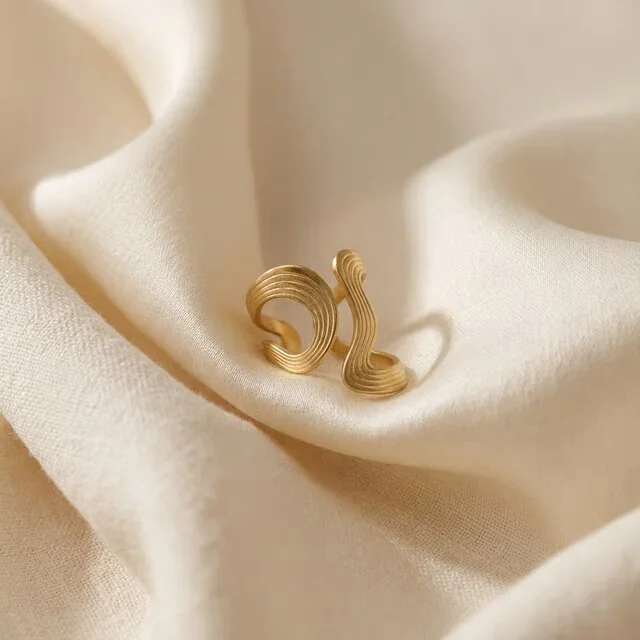
Macro product photograph of the reference ring resting in soft folds of light textured fabric. Use the fabric curves to frame the ring without obscuring its setting, band profile or stone. Preserve the stone count, setting geometry, prongs, sculptural shape, metal color and finish. Warm diffused natural light, clean neutral background, crisp metal detail, shallow depth of field, restrained luxury editorial mood, square composition.Metal is defined by reflections, and a tiny geometry change can turn one ring into another. A plausible result is not automatically an accurate result.
- Trace the sculptural outline, openings, band width, and stone positions against the source.
- Ask whether the warm environment changed the apparent metal color.
- Check that fabric does not conceal the product feature the image is meant to sell.
- Keep the verified macro or on-hand reference beside this image on the PDP.
Reference and result images come from the linked public Astria example.
Lifestyle and campaign prompts
Lifestyle images answer “how does this fit into a life?” Campaign images answer “why should I look?” Neither should be the only evidence of what a product is.
12. Handbag carry context
Waist-to-knee lifestyle photograph of a model carrying the reference handbag at her side while walking through a quiet pale-stone arcade. Preserve the bag's dimensions, handles, closure, hardware and color; keep the full bag unobscured and at realistic scale. Soft morning light, neutral wardrobe, muted architectural palette, natural hand anatomy, vertical 4:5.
13. Skincare bathroom context
Vertical lifestyle photograph of the reference skincare bottle standing beside a folded cream towel on a pale limestone vanity. Preserve the bottle shape, cap, glass color and label placement. Soft indirect morning light, controlled reflection, minimal condensation away from the label, refined natural texture, vertical 4:5, no additional products.
14. Collection tile
Clean collection image containing exactly three reference products arranged at different heights on low dusty-lilac plinths. Preserve the size relationship, shape, materials, hardware and color of each item; do not duplicate or merge products. Warm-white sweep, soft diffused studio light, balanced contact shadows, generous margins, square composition.
15. Wide campaign banner
Wide ecommerce campaign still of the reference handbag on a pale stone bench near a muted sage wall. Preserve the bag's exact geometry, handles, closure, hardware and color. Place the product in the right third with clean negative space on the left for page layout, low warm side light, refined long shadow, tactile realism, 16:9 composition, no text.
Exact backgrounds need a separate check
If a marketplace requires white, write “seamless pure-white background, no horizon line” and request clean edge separation. But prompting is not color measurement. Inspect the delivered pixel values, clipping path, transparency, margins, and file profile after generation. A visually white image may still contain a warm cast or grey corners.
The same rule applies to aspect ratios. State square, 4:5, or 16:9 in the prompt, then export and validate the required pixel dimensions separately.
Build one shot matrix for every product class
Do not rewrite the entire brief per SKU. Create a matrix with rows for media slots and columns for product classes. Keep the studio block stable, then swap only the class-specific preservation clause.
| Product class | Primary facts to preserve | Essential views |
|---|---|---|
| Apparel | silhouette, neckline, sleeves, seams, closures, length, drape | front, back, side, detail, worn scale |
| Footwear | toe, sole, heel, panels, stitching, fastening | three-quarter, outer side, rear, sole, on-foot |
| Bags | proportions, gusset, handles, closure, pockets, hardware | front, side, back, open interior, carried |
| Bottles | vessel proportions, fill, cap, pump, label position | front, side, closure detail, texture, context |
| Jewelry | stone count, setting, prongs, band, finish, scale | verified macro, side profile, detail, on-body, lifestyle |
This turns prompting into a production system rather than a collection of isolated sentences.
Vertical prompt libraries
- AI Lookbook Prompts turns one approved outfit and treatment into an edited fashion sequence.
- Beauty Product Photography Prompts covers reflective vessels, formula texture, hands and campaigns.
- Jewelry Photography Prompts separates ring, necklace and earring geometry from on-body context.
- Wedding Dress Photography Prompts combines gown construction proof with bridal art direction.
- Vitamin and Supplement Photography Prompts adds label, product-form and claims safeguards for supplement imagery.
Review before the images enter the catalog
Use the source product beside the generated output. Check:
- silhouette, dimensions and part count;
- front, side and rear geometry;
- seams, stitching, closures and pockets;
- labels, logos, print and packaging copy;
- material texture, transparency and reflectivity;
- hardware color and attachment points;
- shadows, reflections and contact with the surface;
- scale relative to hands, bodies, furniture or props;
- correct variant, quantity and product configuration;
- channel crop, safe margins, background and file dimensions.
If a discrepancy could change what a buyer believes they will receive, revise or reject the image. The prompt is the specification; review is the release gate.
Frequently asked questions
What should an ecommerce product photography prompt include?
Include the image's channel and slot, the referenced product, the geometry and materials that must remain accurate, camera angle, product orientation, background, light, shadow behavior, crop, and aspect ratio.
How are PDP prompts different from campaign prompts?
PDP prompts prioritize truthful coverage, repeatable angles, clean edges, readable construction, and consistent scale. Campaign prompts can use props, atmosphere, unusual crops, and stronger shadows, but should still state the product features that cannot change.
Can AI product images replace every ecommerce photograph?
No. Keep verified photography where exact label text, regulated information, fine material claims, gemstone details, safety-critical features, or precise color are essential. Generated images are strongest when the product reference and review standard are both clear.
How do you prompt for a pure white background?
Specify a seamless pure-white background, clean product edges, neutral color balance, a restrained contact shadow, no horizon line, no props, and the required crop. Verify the exported pixels and marketplace requirements separately.
How many prompts does one ecommerce product need?
Build prompts around the media slots the page needs: usually a hero, alternate angle, back or side view, construction detail, scale or use context, and one or more campaign crops. The exact count depends on product complexity and channel requirements.