Jewelry Photography Prompts: Rings, Necklaces and Earrings
Jewelry is a geometry problem disguised as a lighting problem. A beautiful result is unusable if it changes the prongs, stone count, chain pattern or scale. Strong prompts therefore lock the piece first, then specify how metal, stones and skin should respond to light.
Inspect the public Jewelry Product Photography workspace, then choose the ring, necklace or earrings template.
Reference → prompt → result
Jewelry
Verify the ring in an isolated macro
The first image should make stone count, setting, profile and metal finish easy to compare with the reference.
- Macro
- 4:5
- Ring proof
Reference inputs
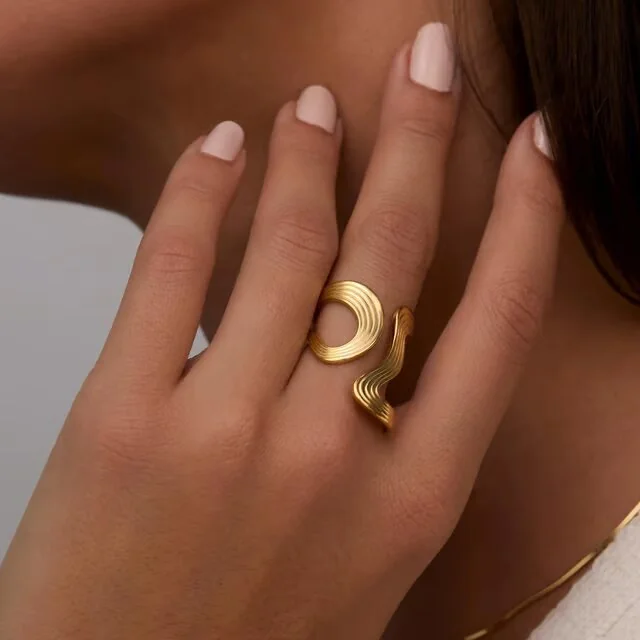
Generated result
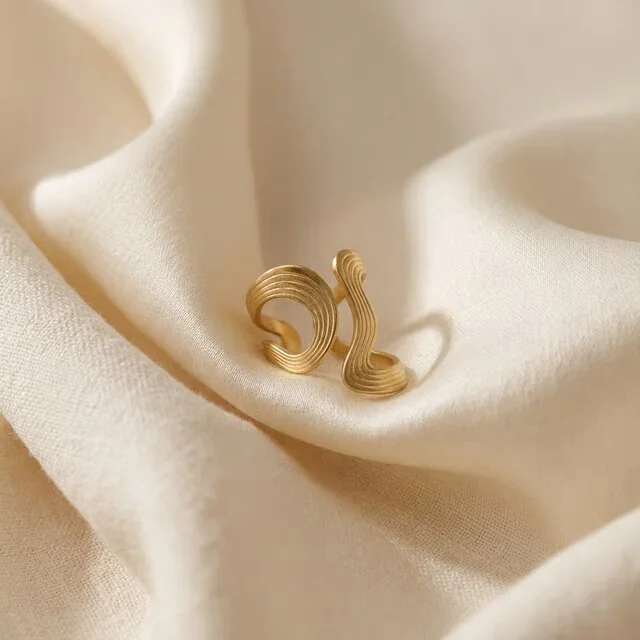
High-resolution macro product photograph of the exact reference ring standing at a front three-quarter angle on smooth warm ivory. Preserve the band width, setting height, stone count, stone shapes, prongs, metal color and polish. Broad rectangular highlight across the metal, small crisp gemstone reflections, clean grounding shadow, no extra stones, vertical 4:5.Tiny changes in prongs, chain links or stone layout create a different product even when the image looks luxurious.
- Count stones and prongs before reviewing mood.
- Compare the profile height and band thickness.
- Check reflections for false seams or duplicated metal.
- Use an on-body frame only after the isolated piece passes.
Reference and result images come from the linked public Astria example.
Eight copy-ready jewelry prompts
1. Ring verification macro
Make the design easy to audit.
High-resolution macro packshot of the exact reference ring at a front three-quarter angle on warm ivory. Preserve the band profile, setting height, stone count, cuts, prongs, metal color and finish. Controlled broad highlight, crisp gemstone facets, clean grounding shadow, vertical 4:5.2. Ring side profile
Reveal construction hidden by the hero angle.
Exact side-profile macro of the reference ring, camera level with the band. Show the setting height, gallery, prongs and band taper without distortion. Neutral pale background, raking light along the metal, restrained stone sparkle, focus stacked product detail, vertical 4:5.3. Ring on hand
Communicate real scale after verifying the product.
Close photograph of the exact reference ring worn on the correct finger of a relaxed natural hand. Preserve the ring design, orientation and realistic scale. Five anatomically correct fingers, clean natural nails, soft daylight, no other jewelry, ring and nearest skin texture sharp, vertical 4:5.4. Necklace front crop
Show chain drape, pendant scale and placement.
Collarbone-to-chest beauty photograph of the exact reference necklace worn centered on bare skin. Preserve chain pattern, length, clasp logic, pendant proportions, stone layout and metal finish. Hair and clothing remain outside the necklace, soft directional daylight, natural skin texture, vertical 4:5.5. Necklace tabletop curve
Prove the full chain without body or clothing occlusion.
Overhead product photograph of the exact reference necklace arranged in one relaxed continuous curve on pale limestone. Preserve every link pattern, pendant, clasp, proportions and metal color. No tangles or broken chain, delicate side light, sharp product detail, vertical 4:5.6. Earring ear crop
Show scale and fastening position in use.
Close side portrait crop showing one exact reference earring worn correctly on the visible ear. Preserve its dimensions, stone layout, metal finish, post or hook and orientation. Hair swept behind the ear, realistic anatomy and skin, quiet neutral background, soft side light, vertical 4:5.7. Pair still life
Check that a pair remains matched and correctly mirrored.
Macro still life of the exact pair of reference earrings arranged side by side on warm grey silk. Preserve both designs, dimensions, stones and fastenings; mirror their intended orientation without duplicating or adding parts. Controlled highlights, subtle folds, both pieces sharp, vertical 4:5.8. Collection banner
Create campaign atmosphere while retaining a clean audit path.
Wide campaign still life of the exact reference ring, necklace and earring set on low ivory forms. Preserve every product and its relative scale. Use controlled pools of light, soft mineral shadows and generous negative space on the left. No generated text, horizontal 16:9.Different products, different failure modes
| Product | Lock in the prompt | Inspect closely |
|---|---|---|
| Ring | Stone count, cuts, prongs, setting height, band profile | Added stones, merged prongs, incorrect scale |
| Necklace | Chain pattern, length, pendant, clasp, drape | Broken links, impossible curves, shifted pendant |
| Earrings | Pair symmetry, orientation, fastening, dimensions | Unmatched pair, wrong ear placement, extra parts |
| On-body | Product scale, contact point, visible construction | Fingers, ears, skin contact and occlusion |
How to build a jewelry set
- Upload sharp front, three-quarter and profile views; include the clasp or fastening.
- Start with the isolated verification macro.
- Count structural details against the reference at 100% zoom.
- Move to on-body scale and lifestyle only after the product passes.
- Review the complete set for one metal color, one scale system and coherent highlights.
For production planning, reference standards and retouching decisions, use the AI Jewelry Photography Guide. For a broader catalog framework, see E-commerce Product Photography Prompts.
Frequently asked questions
How do you prompt jewelry without changing its design?
Name every product-defining feature as fixed, and vary the scene around it.
What lighting works for AI jewelry photography?
Use broad highlights for metal, crisp accents for facets and enough fill to retain the silhouette.
Why include on-body jewelry images?
They prove scale and wearability, provided anatomy and product placement pass review.