AI Lookbook Guide: From Product Photos to a Collection
An AI lookbook uses generated fashion images to show a collection through a consistent cast, setting, and styling direction. Start with product references, approve one complete look, then produce the remaining images against that treatment. The generator supplies images; you still decide which ones belong in the collection.
The short version: a useful AI lookbook workflow preserves both the clothes and the direction. This guide covers inputs, generation, and image review. For the brief, page layout, wholesale information, and delivery checklist, use how to create a lookbook.
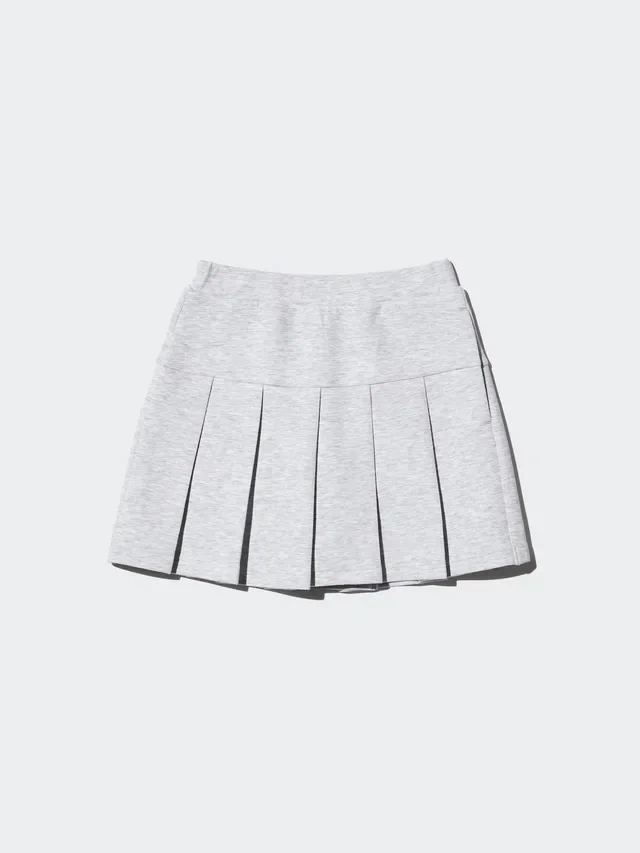
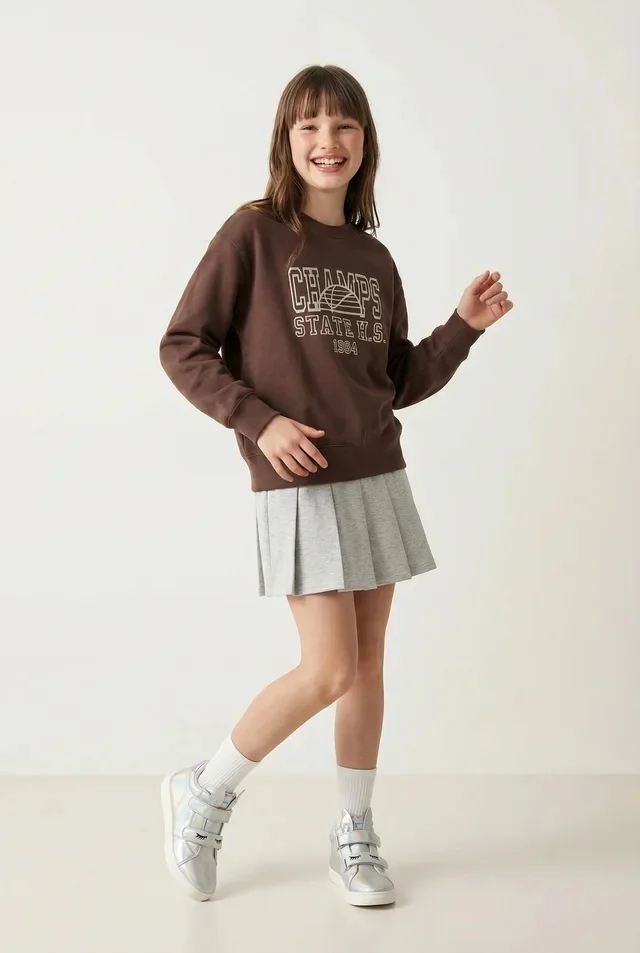
From a skirt photo to a styled look
This look combines the skirt with separate photos of the sweatshirt, socks, and shoes. Compare the skirt’s pleats, length, and color with the original.
What an AI lookbook generator should produce
Worth stating plainly, because half of all lookbook problems are actually category confusion:
| Catalog | Lookbook | |
|---|---|---|
| Job | Let someone buy this item | Make someone want this collection |
| Coverage | Every SKU, every colorway | A curated selection |
| Framing | Consistent, neutral, complete | Varied, composed, editorial |
| Styling | The product, isolated | The product, in a look |
| Success | No returns from misunderstanding | Someone feels something |
Both are necessary. They are produced differently, judged differently, and should not be attempted in the same pass. A brand that tries to make one set of images do both jobs ends up with a catalog that feels sterile and a lookbook that feels incomplete.
What to upload for an AI fashion lookbook
Prepare a folder for each look before opening the generator. Include clear product photos for every garment in the outfit, the intended colourway, and detail references for prints, fastenings, and fabric. Keep the style numbers attached to those references so review never becomes a guessing game.
One front photo cannot establish what the back of a garment looks like. Supply the views you expect to show. If a generator invents a plausible back, that is a concept image until someone checks it against the product. The input pass is covered in flat lay to on-model photography.
Keep three kinds of reference distinct: product for what the clothes are, casting for who wears them, and art direction for light, pose, and setting. Changing a location reference should not quietly change the jacket.
Astria's fashion workflow starts with a template and uploaded product photos. Its lookbook gallery gives examples to inspect. Use a complete set as the reference for consistency, rather than judging a tool by one hero image.
Decide the four things before generating anything
The mistake is starting at the keyboard. A lookbook needs four decisions made first, and made by someone whose taste the brand trusts.
1. Who is she, or he, or they. Not "a female model, 25." A specific person with a specific presence — the way you would brief a casting director. The register of the face, the posture, the energy. If you cannot describe your casting in a sentence that excludes most people, you have not cast yet.
2. What world this collection lives in. A place, a season, a time of day, a quality of light. "Studio, white background" is a catalog answer. A lookbook needs somewhere that means something: the specific coastal town in October, the apartment at 4pm, the empty municipal pool.
3. How it is styled. Which pieces go together, what is layered, what is left undone. This is where a stylist earns their fee and where AI is least able to help you, because styling is knowledge about clothes rather than about images.
4. The sequence. A lookbook is read in order. Which look opens, which closes, where the rhythm changes from wide to close, where colour arrives. Sequencing is the part that turns twenty images into a story, and it is almost universally skipped.
Only after these four does generation start. Everything before this point is the job; everything after is execution.
Production, in order
- Fix the casting. Establish the model as a stored reference so the same person appears in every look. Recognisable continuity is what makes a set read as one shoot — see consistent AI fashion models for the mechanics.
- Build one hero look completely. Get a single image exactly right — light, colour, framing, styling, mood. This is your reference point and it should take real iteration.
- Approve the hero. With whoever owns the brand. Do not proceed on a maybe.
- Derive the treatment from it. The hero look defines the light, grade, distance, and register that the rest of the set inherits.
- Produce the remaining looks against it, varying pose, location beat, and framing while holding casting and grade fixed.
- Sequence and edit. Lay them out in order. Cut the weakest three. A lookbook of eighteen strong looks beats one of twenty-four with six passengers.
- Derive the channel crops. Vertical for social, wide for the site, square for the grid — from the same set rather than as new productions.
A six-prompt lookbook sequence
Write the sequence as one stable production block plus six controlled variations. The stable block should name the approved cast, reference outfit, styling, location family, light, colour treatment, and product details that must not change. The individual prompts then direct the rhythm of the edit.
For this example, the invariant is: the same model, the same reference tailored outfit and shoes, a pale modernist courtyard, soft overcast light, a muted cream-and-mineral grade, realistic fabric behaviour, and vertical 4:5 output. Each frame must preserve the outfit's neckline, lapels, fastening, waist, trouser length, footwear, colour, and material texture.
1. Opener — establish the world
Wide environmental fashion photograph of the model wearing the reference tailored outfit at the entrance to a pale modernist courtyard. Show the complete silhouette and shoes at a smaller scale, with generous architecture around her. She stands still and looks beyond frame left. Soft overcast daylight, muted cream-and-mineral colour grade, restrained contrast, vertical 4:5.
2. Hero — establish the look
Full-body front three-quarter photograph of the same model and reference outfit in the same courtyard. She stands at a 45-degree angle with her weight on the back foot and looks toward the camera. Keep the complete outfit, fastening and shoes clearly visible. Eye-level camera, soft overcast light, quiet shadow, vertical 4:5.
3. Movement — change the energy
Full-body photograph of the same model and reference outfit walking parallel to the courtyard wall, captured mid-step. Preserve the jacket construction and trouser length; allow restrained movement at the jacket hem only. Eye-level camera, consistent soft overcast light and muted grade, natural anatomy, vertical 4:5.
4. Detail — give the sequence a pause
Shoulder-to-hip detail of the same model wearing the reference outfit, focused on the lapel, fastening, waist construction and fabric surface. One hand adjusts the cuff without covering the garment. Same pale-stone setting and soft overcast light, sharp product detail, shallow background, vertical 4:5.
5. Profile — reveal different construction
Full-body side-profile photograph of the same model wearing the reference outfit, paused beside a courtyard column. Keep the jacket length, side seam, trouser silhouette and shoes legible. Camera at waist height, consistent light and colour treatment, subtle asymmetrical framing, vertical 4:5.
6. Closer — resolve rather than repeat
Rear three-quarter photograph of the same model and reference outfit walking toward the courtyard exit, head turned slightly toward the light. Preserve the back construction, hem, trousers and footwear. Add a gentle late-afternoon warmth while staying within the established muted grade, with restrained fabric movement and vertical 4:5 framing.
The order moves wide, full, active, close, graphic, and away. That is enough variation to feel edited while retaining one visual world. If a frame fails, revise its one variable rather than rewriting the shared treatment.
For the visual, copyable eight-frame version of this sequence, use AI Lookbook Prompts. For broader catalog, movement, detail and editorial structures, continue with AI Fashion Photography Prompts. The public Dark Swimwear workspace, Swimsuit Set 1 template, turning frame, and transitional frame show how neighboring poses can belong to one set. Direct prompt pages may ask anonymous visitors to sign in, so the public workspace and template are the reliable starting points.
Why AI lookbooks look like AI lookbooks
They share a recognisable aesthetic, and it is worth naming the tells because they are all avoidable:
- Perfect light everywhere. Real editorial has shadow, blown highlights, and moments where the light is not flattering. Uniform beautiful lighting reads as synthetic faster than any anatomical error.
- Symmetrical, centred composition. Real photographers frame off-centre, cut limbs at the edge, let things be occluded.
- Nobody is doing anything. Standing and looking at the camera, over and over. Movement, weight on one hip, mid-gesture, looking away — this is most of what makes a person in a photograph look alive.
- The mid-Atlantic nowhere. A vaguely European street, a vaguely Californian beach. Specific places have specific architecture, light, and weather.
- No texture. No grain, no lens character, no imperfection. Clean is not the same as good.
- Every garment sitting perfectly. Real clothes wrinkle, ride up, and catch.
A specific brief helps with these problems, but it does not eliminate model limitations. Reject images that cannot preserve the garment or the intended pose.
What to check before publishing
Run this pass with fresh eyes, ideally someone who has not been staring at the set:
- Garment fidelity. Is every print aligned, every logo correct in scale and placement, every closure and hardware right? Reject any detail that misrepresents the product.
- Casting continuity. Is it the same person in look 3 and look 17? Look at the face at full size, not thumbnail.
- Hands and interaction. Especially where a hand meets a bag, a pocket, a cuff.
- Grade drift. Put all the looks on one screen. Warmth and contrast creep is invisible one image at a time.
- Styling logic. Would a stylist have put these pieces together? Is the layering physically possible?
- Does it say anything? The hardest question. If you removed the logo, would anyone know whose collection this is?
Where the savings actually are
Estimate the savings against your actual brief. The opportunities are:
- Scheduling. Generating from suitable references can reduce live-shoot coordination. You still need accurate product inputs and time for review.
- Revision. A warmer treatment can be tested on an approved frame before revising the set. Check the garment colours again after any grading change.
- Reuse. Next season starts from approved casting, references, and treatment rather than from nothing.
- Extension. Campaign frames, social crops, and motion come from the same direction — see AI fashion film.
The cost that does not go away is the creative direction. It should not; it is the only part a customer can tell apart from anyone else's.
The full production picture, including catalog work, is in the AI fashion photoshoot guide, and the process-level walkthrough is in how to create a lookbook.
Frequently asked questions
What is an AI lookbook generator?
An AI lookbook generator creates fashion images from product and creative references. Producing a finished lookbook still requires selecting the images, checking the garments, and arranging the set into a deliberate sequence.
What references do you need for an AI lookbook?
Supply clear references for each garment and colourway, including the back and any details that will appear. Keep product, casting, and art-direction references separate so a scene change does not become a product change.
Can one AI model appear across an entire lookbook?
Yes, and it should. Casting continuity is what makes a set of images read as one shoot. It requires the likeness to be stored as a reusable reference rather than re-described in each generation.
How long does an AI lookbook take to produce?
Allow time for references, a pilot look, revisions, garment checks, and final selection. Generation time alone is not a delivery estimate. Time a small approved batch before committing to the full collection.
Will an AI lookbook look generic?
It will if the direction is generic. The tools default to a glossy, well-lit, mid-Atlantic aesthetic, and accepting that default is what makes AI lookbooks recognisable. Specific casting, specific location logic, and deliberate imperfection are what break it.
Explore Astria for fashion and ecommerce.
For current Astria rates and billing terms, see Astria pricing.