Lumoo Alternatives (2026): A Shortlist for Fashion Catalogs
If Lumoo Air is on your shortlist, compare WearView for focused on-model work, FASHN for try-on and developer integration, and Astria for template-led collection imagery. Keep Lumoo in the evaluation: switching only pays if another workflow solves a specific problem with your products, team, or output requirements.
This guide is for buyers considering several alternatives. The Astria vs Lumoo comparison covers the two-product decision in more depth.
Disclosure: this guide is published by Astria. Reviewed September 5, 2026 against public vendor material; no controlled image-quality or cost benchmark was run. Workflow recommendations are our interpretation, not measured vendor rankings.
An Astria example: product photo to model image
The sweatshirt on the left is one of the product photos used to create the styled look on the right.
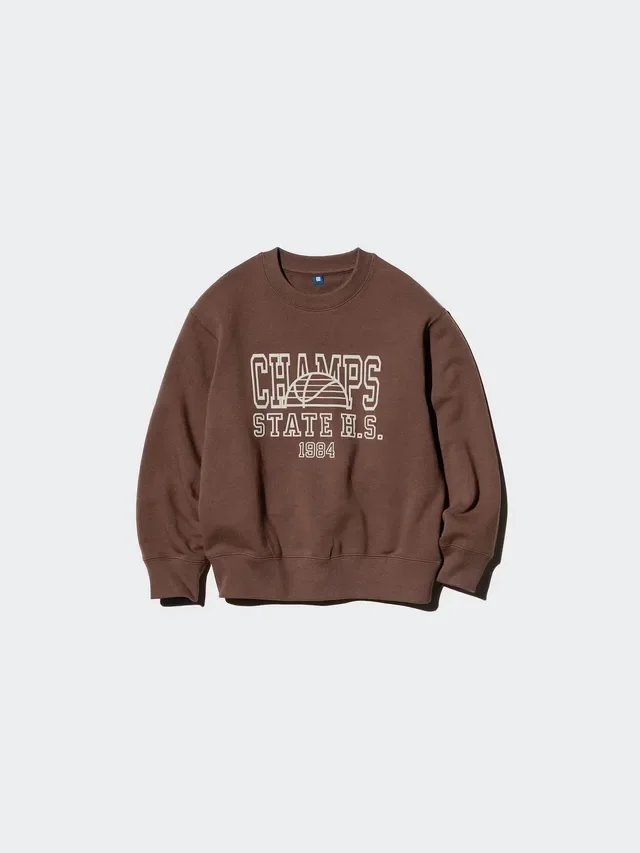

This shows an Astria result. The other platform was not tested with these same photos.
Establish what Lumoo already covers
Lumoo Air's product page presents a connected workflow from one product photo to model shots, detail views, and video, with editing and live collaboration. Check Lumoo pricing for current rates, allowances, workflow templates, and integration access.
Those capabilities matter: a search for an alternative should not start by assuming Lumoo lacks templates, collaboration, or a store connection. Its plan illustrations are estimates of output, not guarantees of accepted catalog images. Test the relevant workflow and confirm the integration's actual scope before buying.
Three alternatives, three reasons to evaluate
| The specific requirement | Put on the shortlist | What must improve in the trial |
|---|---|---|
| On-model images with repeatable casting and pose control | WearView | Garment accuracy and casting continuity across the same product set |
| Try-on inside an application or automated process | FASHN | Integration behavior, output quality, and operational cost |
| One photographic direction across a collection and its campaign | Astria | Reuse of the approved treatment and quality across products |
| The current workflow already meets quality, budget, and delivery needs | Lumoo Air | Another supplier must show a concrete benefit to justify migration |
This is deliberately a short list. Adding ten nearly identical generators makes evaluation slower without making the purchase clearer. If you are still deciding which category of tool you need, use the broader fashion photography platform guide.
WearView: compare the on-model workflow
WearView's plan page lists product-to-model, consistent model generation, and pose control on Lite. Pro adds model swap, ghost mannequin, video, and five team members; Advanced lists fifteen team members. API access is presented under Enterprise. These make WearView a relevant candidate for a team concentrating on garment presentation.
The evaluation: choose one recurring face and a fixed pose brief. Produce several garments, then add a new colorway. Compare face continuity, garment silhouette, and how much manual correction the operator needs. Test your own inputs; product-page examples do not establish performance on sheer fabric, unusual sleeves, or small prints.
The tradeoff: check the feature tier you actually need before comparing price. Use WearView pricing for current credit requirements for your resolution and workflow; our WearView comparison supplies the wider buying context.
FASHN: evaluate try-on and integration separately
FASHN offers a web app and a developer API. Its API documentation covers try-on, product-to-model, model creation, editing, and image-to-video endpoints. This is useful when the job includes integrating generation into a service, rather than operating only a visual editor.
The evaluation: give the developer and creative reviewer the same test set. Require a successful garment transfer, a useful response to an invalid input, retrieval of the output, and a repeat run without losing the product identifier. An attractive manual result alone does not prove the automated workflow is ready.
The tradeoff: API integration requires someone to own input preparation, error handling, output storage, and review. If no one will maintain those parts, evaluate the app first. Its pricing page distinguishes app and developer pricing, and notes that tool costs rise with settings. Daily credits expire within their daily window, so they should not be treated as a single allowance available on launch day.
If “try-on” means a shopper-facing experience rather than images prepared by your team, read virtual try-on for fashion brands before comparing plans. The FASHN comparison covers its overlap with Astria.
Astria: test the collection's creative direction
Astria's fashion workflow combines product references and templates for lookbook, campaign, and social imagery. It belongs on the shortlist when the buying question is whether one approved direction can produce a useful set across your collection.
The evaluation: agree a treatment for casting, crop, lighting, and setting. Run five products, including the difficult ones. Then change the output format and add another SKU. Ask the reviewer whether the collection still reads as one production, and record the operator time needed to make that happen.
The tradeoff: creative direction and product review still need an owner. A brand satisfied with its current catalog images may not benefit from adding a more elaborate campaign workflow. This guide does not establish that Astria is cheaper or more accurate than Lumoo.
For automated work, review Astria's API documentation as well as the creative trial. Account balance, callbacks, error handling, and storage terms affect a production integration. Do not assume keeping a URL in a spreadsheet is the same as archiving an output.
Price an accepted set, not a credit allowance
Use one fixed brief across all shortlisted tools: ten products, two catalog views per product, and five campaign frames. That is 25 accepted images. State the output resolution and which garment details must remain accurate before anyone starts generating.
Track each tool's actual attempts, charged credits or balance, editing minutes, and accepted files. Do not mix euros and dollars without a stated exchange rate, and do not mix monthly subscriptions with an annual price advertised as a monthly equivalent.
Divide the full production spend by the number of accepted images. If the approval count halves for the same spend, cost per accepted image doubles. Include labor, rejection, and rework. The cost-per-SKU guide explains how to extend this to a collection budget.
Check your launch calendar too. A plan sufficient for a steady trickle of images can behave differently when the whole collection is due on one day. Ask about additional usage and scheduling against that actual deadline.
A migration test that catches product errors
- Use representative references. Include a simple garment, a patterned item, a difficult material, and an unusual construction. Supply front, back, and detail photographs where required.
- Agree rejection criteria. Wrong fastenings, invented seams, altered print placement, and changed product proportions should fail even if the picture looks attractive.
- Test revisions. Add a colorway and request a new crop after the first set is accepted. Record what must be repeated.
- Test handoff. Have another team member find the correct source product, approved result, and reusable setup without help from the original operator.
- Move a small batch first. Retain source photography, SKU mapping, exports, and approval notes. Expand only when the new process produces a better outcome for the stated requirement.
A generated back view deserves particular care. If the reference never shows the back closure or seam construction, the tool cannot establish those facts from appearance alone. Publish only after checking the view against the actual product.
Frequently asked questions
What is the best Lumoo alternative for a fashion brand?
Evaluate WearView for a focused on-model workflow, FASHN for try-on and developer integration, and Astria for template-led collection imagery. Choose using representative products and the workflow you need to improve, rather than a universal ranking.
Do I need to leave Lumoo to use templates or Shopify?
Not necessarily. Lumoo Air's published Basic and Pro plans list workflow templates and Shopify integration. Confirm the exact integration steps you need before treating a move to another vendor as necessary.
Which Lumoo alternative is cheapest?
This review does not establish a cheapest option. Compare cost per accepted image at the required resolution, including failed attempts, editing, and plan costs. Credit counts and vendor output estimates are not directly comparable.
Can an AI tool reliably invent a product's back view?
A plausible generated view is not evidence of the product's real construction. Supply reference photography for unseen details and verify closures, seams, prints, and proportions before publishing a generated view.
Sources and methodology
Sources linked beside the claims are first-party product pages, published plan terms, and API documentation checked on September 5, 2026. Lumoo Air's rendered product page was also inspected directly because the page's content was not fully available in the text fetch. Use the linked pricing page for current Lumoo plans and confirm checkout terms before purchase.
We did not run paid-account trials or independently verify vendor quality claims. The test brief and cost calculation are evaluation tools, not evidence of a vendor's results. Cover imagery is an editorial illustration, not a sample from any compared platform.
For a design-stage decision, see StyTrix alternatives. For a different starting supplier, see Botika alternatives. To test the collection workflow, explore Astria templates.
For current Astria rates and billing terms, see Astria pricing.