Fashion Campaign Variations in Photoshop With AI
A creative director wants to compare a rooftop with a beach. A campaign designer needs a full-body composition as well as a closer portrait. A marketing team wants alternatives that change one creative decision at a time.
The Astria Nano Banana Photoshop plugin lets the team explore those directions from an existing image and keep the options in the same document. Organize the work around setting, styling, lighting and composition so every option answers a clear question.
Watch a fashion concept change setting and framing
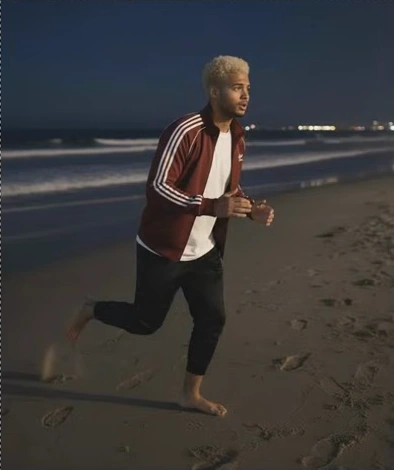
The fashion workflow demonstration revises trousers, reveals more of the model through wider framing, adds and removes sunglasses, changes the setting and time of day, and explores a running pose. The panel contains several model choices; use the model and controls available in your installed version for your own brief.
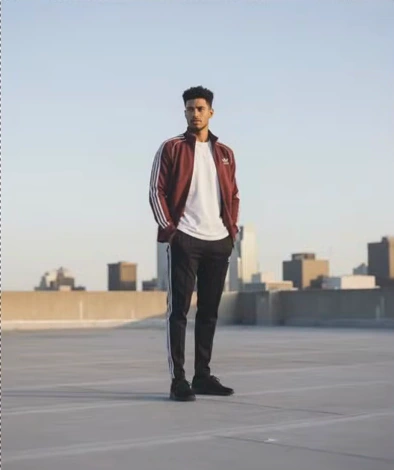
00:14 — Rooftop composition before the beach, pose and close-up changes.
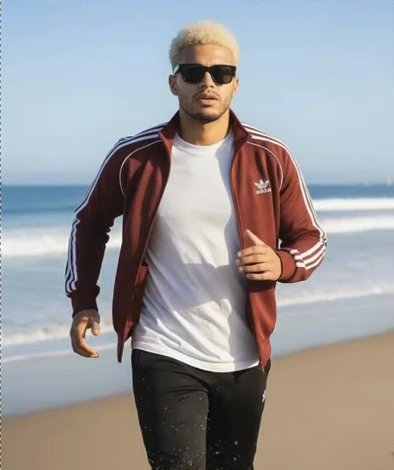
01:12 — Daylight beach close-up after the sequence changes location, pose, hair and sunglasses.
Select an image to enlarge it. Frames are cropped from the original video.
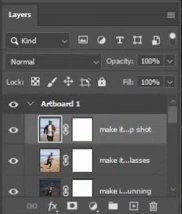
01:12 — Successive campaign results and their masks remain in the layer stack. Layer names are truncated in this recording.
Watch the original Astria demonstration. The recording shows an earlier plugin interface; use the current panel for the selection, reference-image and returned-layer workflow. Illustrations are stills from that recording.
Separate the creative variables
The video moves quickly through several transformations. For an approval round, slow the process down and establish which variable each option changes. Keep one approved styling source, then generate a rooftop, beach or studio direction from that source rather than allowing each setting to inherit all the previous changes.
Compare day and evening versions separately from location choices. If one image gains a new pose, sunglasses and a different hair color at the same time, the creative director cannot easily tell which change made it preferable.
Use references for the garment and person when their continuity matters. The visible jacket, closures, stripes and face should remain reviewable across the set. A strong campaign atmosphere does not resolve a changed product detail.
Build compositions around the placement
A wide image can establish the setting and leave space for a headline. A full-body image makes styling legible. A close portrait emphasizes expression or an accessory. Start with the placement's actual aspect ratio and the part of the product that needs to remain visible.
When extending the frame, inspect everything the model introduces outside the source: feet, trouser hems, ground contact and the direction of shadows. Keep exact headline copy and brand artwork on ordinary Photoshop layers after the image direction has been selected.
Give creative and marketing teams different review criteria
| Role | Application | Review question |
|---|---|---|
| Creative director | Compare campaign worlds and visual mood | Does the direction express the brief? |
| Fashion designer or stylist | Check wardrobe and accessories | Does the actual product remain recognizable? |
| Campaign production artist | Refine composition and masks | Will the image work at the required crop and size? |
| Performance marketing designer | Prepare controlled creative alternatives | Which attribute differs between the candidates? |
| Social content lead | Adapt an approved direction to placements | Is the product clear in each format? |
| Creative operations manager | Organize versions and approvals | Which source and references produced the approved option? |
Prepare assets for a useful creative test
The plugin creates candidate images. Run audience or campaign testing in the team's normal testing system, with the chosen imagery, copy, placement and audience recorded. Keep versions comparable if the question is whether a setting or composition changes performance.
Do not describe a generated alternative as a winning ad before it has been tested. First approve visual quality and product fidelity, then export the selected candidates with a naming convention that identifies the creative difference.
For a complete collection and shot sequence, use the AI lookbook guide. For image directions that will later become motion, see the fashion video ads guide.
Get the Astria Photoshop plugin to develop campaign directions from your existing imagery. Current terms are on Astria pricing.
Frequently asked questions
Can I change a fashion photograph's background in Photoshop?
Use the source image as context, select the region to change, and describe the new setting in the Astria panel. Review subject edges, reflections, ground contact and lighting on the returned layer.
How can I compare campaign variations fairly?
Start each candidate from the same approved source and references, change one creative attribute at a time, and keep crop, output size and review criteria consistent.
Does the Photoshop plugin run A/B tests?
This workflow creates creative assets for a later test. Run the test and measure its results in your existing advertising, ecommerce or research system.