Ghost Mannequin Alternatives: Which Workflow to Choose (2026)
The best ghost mannequin alternative depends on what you want to stop doing. Dressing forms, waiting for neck composites, and showing clothes without a person are three different problems. They do not need the same replacement.
The short version: use flat lay when you need a simpler product-only view, a live model when the worn garment needs to be documented, and AI on-model when you have approved product references and need more styling options. Keep ghost mannequin where its clean, body-shaped presentation still earns its place.
Upfront disclosure: Astria publishes this guide and offers AI fashion imagery. The comparisons below are editorial production judgments, not results from a timed vendor benchmark.
Reviewed September 5, 2026. Service descriptions were checked against first-party sources. No universal cost saving or conversion lift is assumed.
An Astria example: dress photo to packshot
Compare the original dress with the generated image, especially the neckline, seams, and hem.
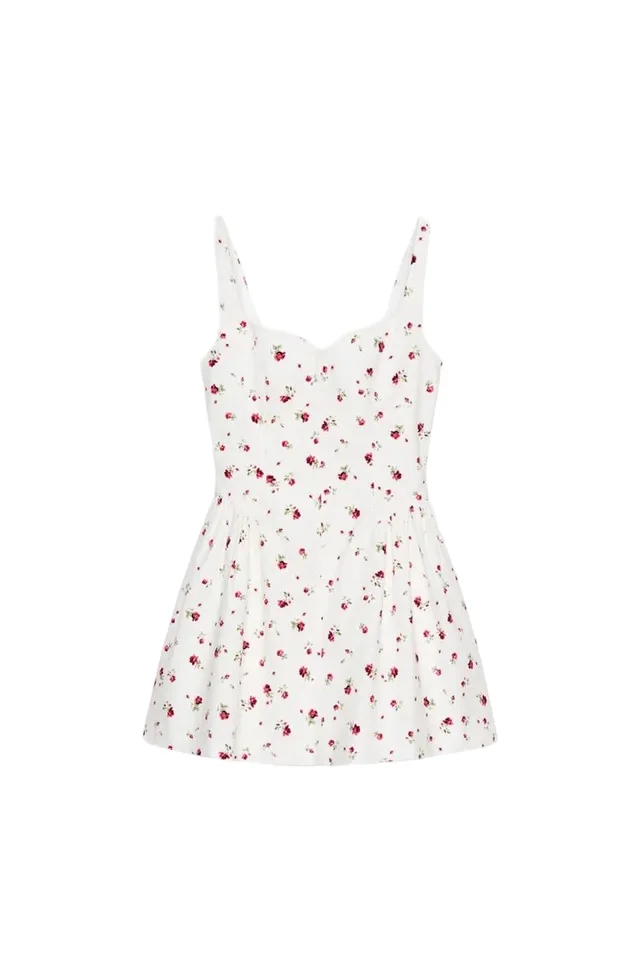
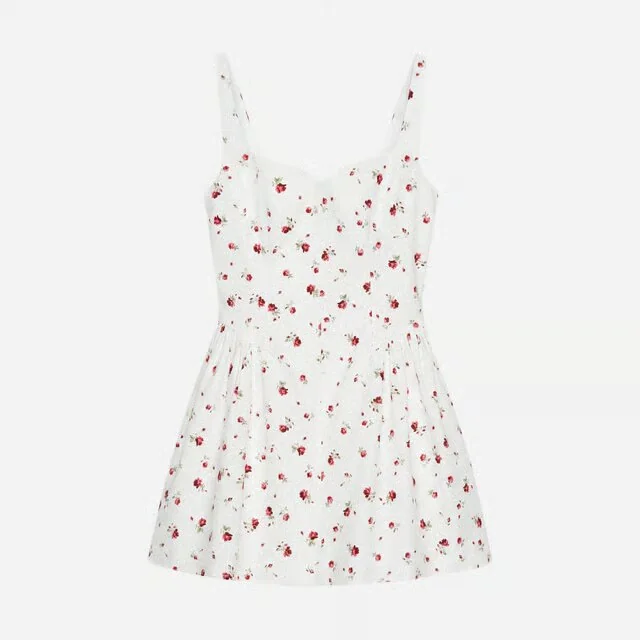
This shows an Astria result. The other service was not tested with this same photo.
Choose the alternative by the work it removes
| Route | What changes in production | What the image gives you | What you still have to solve |
|---|---|---|---|
| Keep ghost mannequin | Dress a form, capture hidden areas, join the views | Isolated garment with body volume | Styling, accurate joins, and product review |
| Outsource the composite | Move masking and joining to a retouching service | The same ghost mannequin format | Physical capture and approval remain with your team |
| Flat lay | Arrange and photograph the garment on a surface | Unobstructed product shape, graphics, and details in a flat state | Body volume and worn appearance need other views |
| Hanger photograph | Suspend the garment and photograph it | A hanging silhouette with no person | The hanger affects shoulders and supplies no torso volume |
| Live-model photograph | Schedule a wearer, style the sample, shoot selected poses | Observed drape and proportions on that person | Sample fit, shoot coordination, and retouching |
| AI on-model | Prepare references, choose a treatment, generate, review, correct | A generated worn presentation and styling options | Product fidelity, invented drape, and rejected outputs |
These are workflow differences, not speed rankings. A heavily styled flat lay can consume more time than a familiar mannequin setup. An AI image that needs repeated correction can miss a deadline that a short model session would meet.
If you already know you want to keep the hollow garment format, use the ghost mannequin capture and compositing guide. If you have chosen AI on-model and need source preparation, use flat lay to on-model.
When the bottleneck is editing, keep the format
A queue of unfinished collars is a capacity problem. Changing the entire catalog to on-model imagery introduces casting, styling, and gallery decisions before it fixes that queue.
Pixelz describes its ghost mannequin service as combining multiple supplied product images in post-production, with manual, FTP, and API upload options. That is a concrete alternative to making every composite in-house. It still needs the source photographs.
Before switching formats, ask a retouching provider to process a representative set using your existing crop, garment shape, and color standard. Compare revision time and accepted results with the current process. If the catalog presentation is already useful, moving the joining work may be enough.
An AI tool that produces another hollow garment image is also preserving the format. Ask which visible areas come from supplied photographs and which are generated. A plausible invented lining is a different deliverable from a composite of the photographed lining.
When you need simpler product-only capture
Flat lay is the clearest alternative when chest or hip volume is not the point of the image. A graphic tee may need its print shown without folds crossing the design. A matching set may need both pieces visible together. There is no reason to create an invisible torso for every such view.
Shopify's clothing photography guide describes flat lay as an overhead view on a surface and distinguishes it from model, mannequin, and lifestyle photography. It also recommends planning the angles and detail views needed for each product. A simpler setup does not eliminate the shot list.
A hanger is another option when the suspended garment reads well and fits the brand's presentation. Judge the actual sample: if the shoulders collapse, the neckline stretches, or the body hangs like a narrow tube, the hanger has removed information you needed. Keeping the hanger visible can be more straightforward than retouching it out and reconstructing the area behind it.
Our recommendation: choose these formats for their useful product view, then account for any missing view elsewhere in the gallery. Do not treat a single flat lay as an equivalent replacement for a front, back, and volume set.
When a person is the missing information
Live-model photography is the strongest choice when the buying question concerns the actual garment on a body: where a sleeve ends, how a skirt falls when standing, or what an open jacket reveals.
The photograph records one sample, one wearer, one pose, and any styling adjustments. It does not prove how every size fits every shopper. Record the model's measurements and sample size, and avoid pinning that changes the feature you are trying to show.
For a dress whose appeal is its drape, a short, controlled shoot may be a more useful investment than perfecting a hollow silhouette. Keep separate detail views for features that hair, hands, or styling obscure.
This is a decision about what to document. A brand can still use ghost mannequin for the clean front view and a real wearer for the side profile or movement. There is no requirement to make every gallery slot use the same format.
When AI on-model is a useful replacement
AI on-model is worth testing when the missing asset is a styled presentation and the product has already been photographed clearly. It can make an existing reference library useful in more contexts. It also introduces a new approval task: checking that the rendered garment still describes the item being sold.
Pixelz's August 2026 synthetic-model workflow starts with real product imagery, prepares it before generation, reviews the generated result, and sends selected outputs through final post-production. Its description supports the practical boundary: generation is one stage of production, and convincing outputs can still contain product errors. This is a vendor-described process, not evidence of an approval rate.
Astria's ecommerce workflow lets brands select creative templates, upload product photographs, and generate imagery for lookbooks, social, and campaigns. For a team moving beyond product-only presentation, that provides a route to test an on-model treatment using existing inputs.
Our recommendation is to start with a garment whose identity you can verify from the references. Approve the neckline, sleeve length, print placement, seams, closures, and opacity before judging whether you like the model or background. If the generated image supplies a back view that you never photographed, it has not established what the back looks like.
Keep a physical worn view when drape or fit is the selling point and the generated result cannot be checked adequately. AI on-model is a visual interpretation, not a measurement-based fit test. The virtual try-on guide covers that distinction in more detail.
Decide what leaves the gallery, not just what enters it
A practical replacement brief names a gallery slot and the information it must retain. “Replace ghost mannequin” is too broad.
| Example brief | Sensible decision | Condition for making the switch |
|---|---|---|
| Basic tee needs a clearer graphic view | Test flat lay as the product-only front | Full graphic and garment proportions remain readable |
| Tailored blazer needs its structured shape shown without a person | Keep ghost mannequin; improve or outsource the composite | The existing format serves the requirement |
| Dress needs evidence of worn length and fall | Add or prioritize a live-model view | Sample size, wearer, and styling are documented |
| Existing ghost images are accurate, but the gallery needs outfit context | Add an approved AI on-model image | Styling does not hide or alter product-defining features |
| New drop has no usable product photographs | Capture references before selecting an AI route | The actual colorway and construction can be verified |
These examples are recommendations for a pilot, not claims that a garment category always succeeds in one format.
An old ghost mannequin image does not become obsolete when an AI model arrives. If it still gives shoppers a clearer view of the product, keep it. The alternative may replace the next shoot's presentation work while leaving useful existing assets in service.
Compare the cost of a complete approved gallery
A price per composite and a price per generation buy different things. For this decision, use the cost per SKU with its required gallery approved.
Count sample preparation, capture, outside fees, generation, retouching, operator time, reviewer time, and corrections. Include a physical shoot fallback for products the alternative cannot handle. For planning, allocate shared setup across the expected batch and value internal time at the same rate in each route.
Then count coverage. A cheaper front image is not a saving if it requires a new side image to recover information the original showed. Conversely, keeping an approved ghost image and adding one useful on-model view may cost less than replacing the entire set.
For a numeric costing framework, use product photography cost per SKU. For the broader allocation of studio and AI work across campaigns, see AI product photography versus a packshot studio.
Run a six-SKU replacement test
Choose two routine items, two recurring production problems, and two difficult products from your own range. This is a suggested operational sample, not a statistically representative experiment.
- Name the bottleneck. Record whether you want to reduce dressing time, composite revisions, shoot scheduling, or missing on-model coverage.
- Fix the gallery brief. Require the same product information, output dimensions, and deadline for the current route and the candidate alternative. Preserve the approved physical references.
- Set acceptance rules before production. Product-changing errors are failures. Name who checks them, and set a revision limit after which the SKU returns to physical capture or the existing workflow.
- Record the whole job. Track elapsed time, human minutes, outside spend, rejected outputs, missing views, and whether each complete gallery passes. Count failed attempts and fallback work.
- Switch only the passing group. If basics pass and patterned items do not, use separate routes. Keep the current gallery available until the replacement is approved.
Check the destination channel's current image requirements before making a candidate your main image. For Amazon, start with the apparel image guide and the category-specific source it points to.
Production approval and sales performance are separate questions. After the accuracy review, test gallery presentation with your own traffic. Do not attribute a sales change to on-model imagery if the same launch also changed pricing, promotions, or assortment.
Frequently asked questions
What is the best alternative to ghost mannequin photography?
Choose flat lay for a simple product-only view, hanger photography for a suspended presentation, live-model photography to document the garment worn by a real person, or AI on-model imagery for styling variations from approved references. Keep ghost mannequin when isolated body volume is the requirement. The best choice depends on the job of the image.
Can AI replace a ghost mannequin shoot?
AI can replace some new presentation work when suitable product references already exist and the outputs pass review. It does not remove the need to document the garment. If a generated image changes seams, print placement, opacity, or proportions, use a corrected output or physical photography instead.
Is outsourcing ghost mannequin retouching an alternative?
It is an alternative to doing the composite in-house, but it keeps the ghost mannequin format and source-photography requirements. Consider it when editing capacity is the bottleneck and the existing product presentation already works.
Is flat lay cheaper than ghost mannequin photography?
Flat lay can avoid mannequin dressing and interior compositing, but styling, capture, retouching, and approval still take time. Compare the total cost of an approved product gallery with the same required views, including any extra images needed to explain volume or worn appearance.
Should I remove existing ghost mannequin images when adding AI models?
Keep accurate existing images while testing the new format. A product-only view and an approved on-model image can serve different gallery roles. Remove a ghost mannequin view only when its replacement covers the same information and the remaining gallery still represents the product accurately.
Sources and methodology
Research checked September 5, 2026: Shopify's clothing photography guide, Pixelz's ghost mannequin service, Pixelz's synthetic-model production account, and Astria's ecommerce product page. These are first-party descriptions of formats and services. The decision tables and pilot are our editorial recommendations; no side-by-side production trial was conducted for this article. The cover is an AI-generated editorial illustration, not a tested product conversion.
Explore Astria for fashion and ecommerce.
For current Astria rates and billing terms, see Astria pricing.